
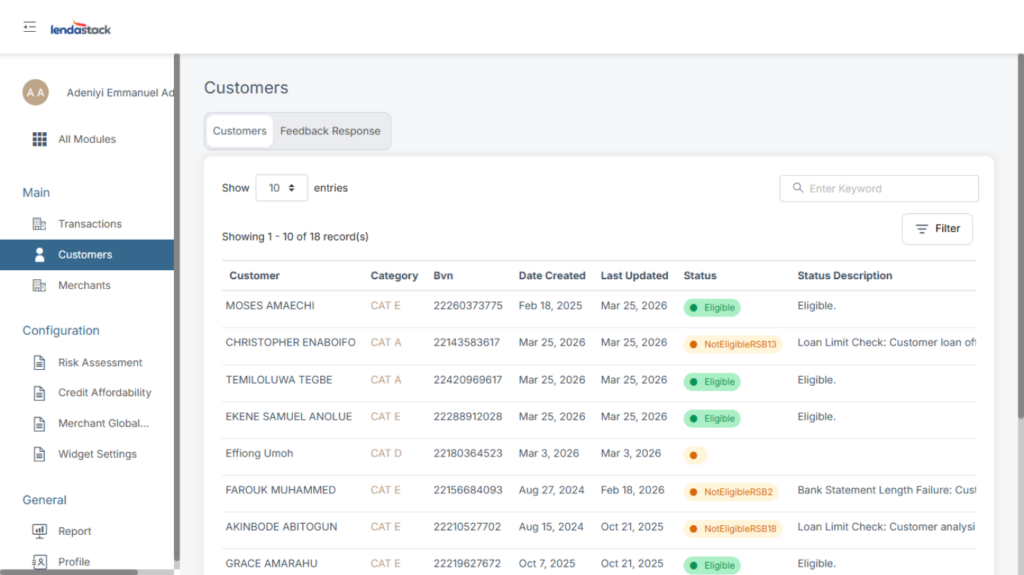
On the side bar, scroll up under Marchant. Click on “Customers”. This brings up a detailed page with Customer information and Feedback Response.
Click on “Customer” to view customer information, e.g. Name, Category, BVN, Date Created, Last Updated, Status, Status Description; one will be able to see all customer information displayed.
On the customer’s name, right after “Status Description” click on the action button; this brings up two options.
View Afford Profile
View Credit profile
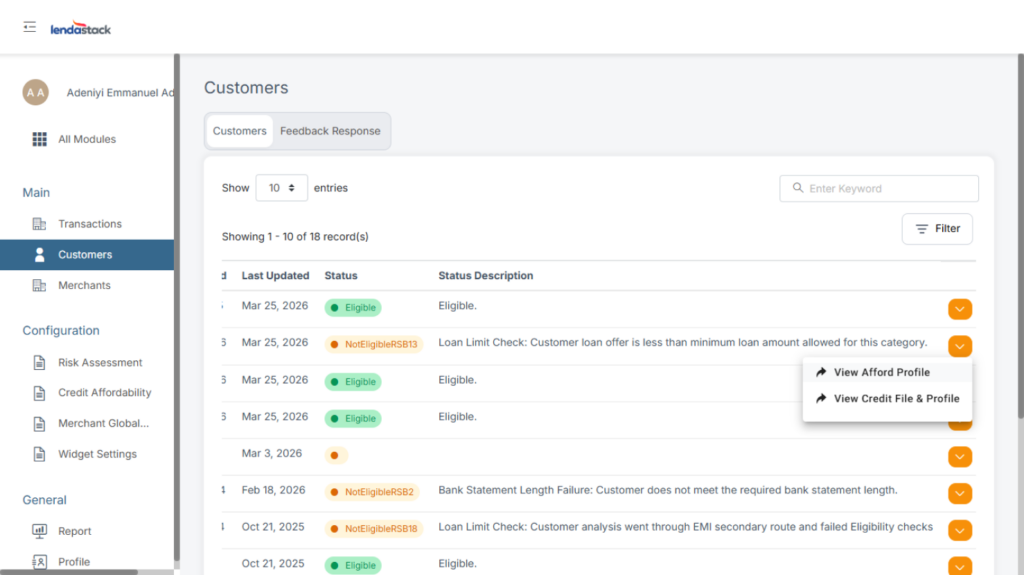
View Afford Profile:
Once click on view afford profile, it brings up a page where you can see detail information about the customer, information’s such as
(Risk Category, Requested Amount, Loan Limit Amount, Most Repayment Amount Per Month, Total Repayment Amount Per Month, Quick Check, Narration Cipher Outcome, Account Cipher Outcome, Loan Limit Outcome, Last Updated Time)
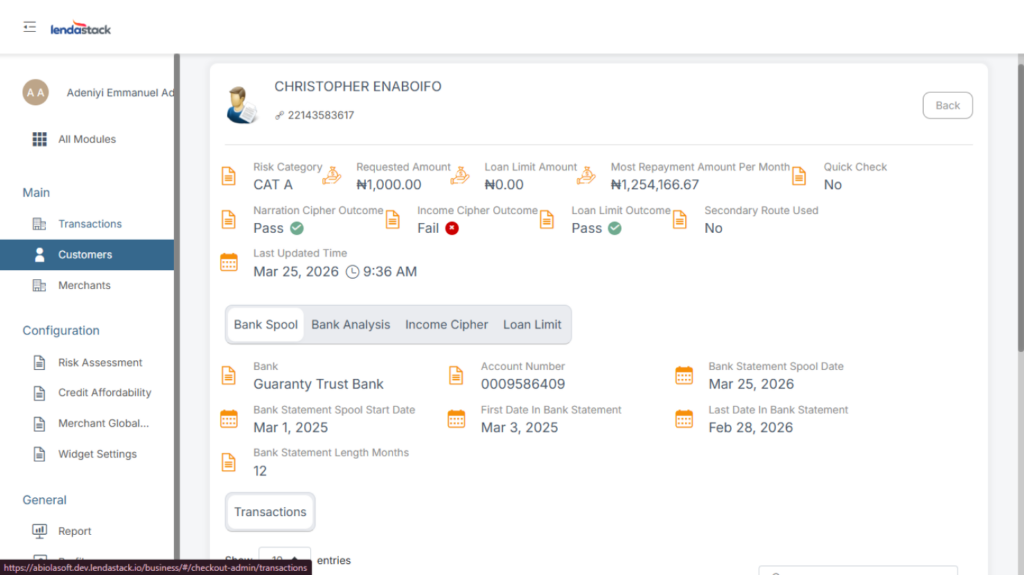
Bank Analysis, Account Activity, Loan Limit
Bank Analysis:
Bank Account Number
Bank Statement Spool Date
First Date in Bank Statement
Last Date in Bank Statement
Bank Statement Length Months
Earning Class, Gambling Rate
Expected Salary Day
Confidence Interval on Salary Detection
Monthly Average Bank Charge Amount
Salary Transactions
Account Activity:
Fail Point
TMI
Pass Rate
Three Months Pass Count
Monthly Average Bank Charge Amount
Bank Account Transactions
Loan Limit:
Fail Point
Repayment
Loan Limit Cipher Calculated Limit Amount
TMI
Interest Rate Used (%)
DTI (%)
Max Tenor
Min Loan Amount
View Credit profile:
Once click on view credit profile, it brings up a page where you can see
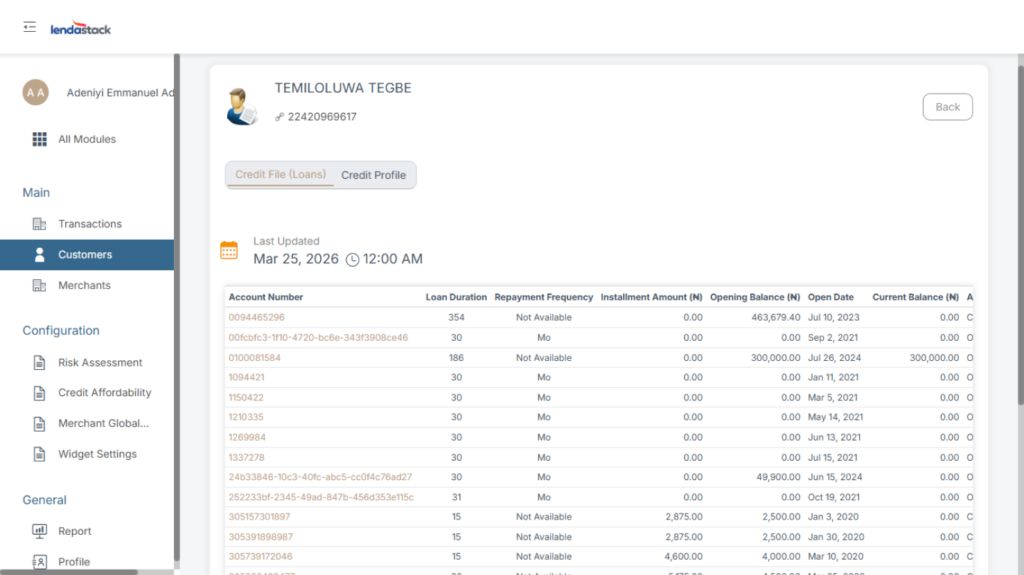
Credit files
Credit profile
Credit files: Once you click on the credit file, it opens with date and time at the top of the page with a list of information about the customers with a list of sub-headings.
(Account number, Loan Duration, Repayment Frequency, Installment Amount, Opening Balance, Open Date, Current Balance, Account Status, Performance Status, Last Updated, Close Date, Exempted).
Credit profile: Once you click on the credit profile, it opens with a list of information with a list of sub-headings.
DF01: Decision factor- score based on the customer’s delinquency count level ascertained from the credit file
DF02: Decision factor- score based on the customer’s delinquency count level ascertained from the credit file
OLA: Open Loan in Arrears- This is the score counts for all customer’s loans in arrears that are open
CLD: Closed Loan Delinquency-This is the score counts for all customer’s loans in arrears that are closed
Max Loan Amount
Highest Installment Amount
Total Installment Amount
Subcategory
Open Loan Count
Closed Loan Count
Last Updated Time
Feedback Response
click on “Feedback Response”. This brings up a detailed page with information’s about the customer application.
Status: One will be able to see if the customer was eligible or if an issue arose while creating the application. E.g. system error
Internal Description: internal description of the status of the customer.
Feedback To Customer: you can see messages that were sent to the customers. E.g. We’re unable to approve a loan for you now. Please consider reapplying in the future or contact us if you’d like to discuss your options.