
Completely customize the details and settings of your Credit Affordability
Loan configuration
Click on loan configuration, this action pops up a modal, where you can configure your loan with the requirements provided below
- Auto Decline toggle: This configuration allows users to enable or disable automatic decline for any loan categories (A, B, C, D, E).
- No Bank Check toggle: This configuration allows users to enable or disable bank check for any loan categories (A, B, C, D, E).
- Limit Threshold Amount: Define the maximum allowable loan amount across all categories.
- Min Income Amount: This sets the period in months, which is how far back in the bank statement should the transaction search be for
- Max Tenor (months): Users can set the maximum loan tenor (repayment period) in months by category for which all loan limits will be generated
- Min Loan Amount: This configuration will allow users to define the minimum loan amount allowed per category.
- Max Loan Amount: This configuration allows users to define the maximum loan amount allowed per category.
- Max DTI % (Debt-to-income): This configuration allows users to set a maximum allowable Debt-to-Income ratio per category.
- Installment Multiplier (%) (on the installment inclusive of interest): This configuration will allow users to set a multiplier factor used in the determination of a loan application.
- Interest Rate (%): Users can set the interest rate for loan calculations per category.
It contains the following features:
- Roles and permissions
- Users
- Bulk processes
- Activity log
- Profile
- Customer Management: The Customer Management feature allows users to create and maintain a complete database of all customers in a structured, easy-to-access format.
- Automation & Analytics
Save time by automating repetitive tasks and use detailed reports to understand performance, track lead sources, and improve sales strategies.
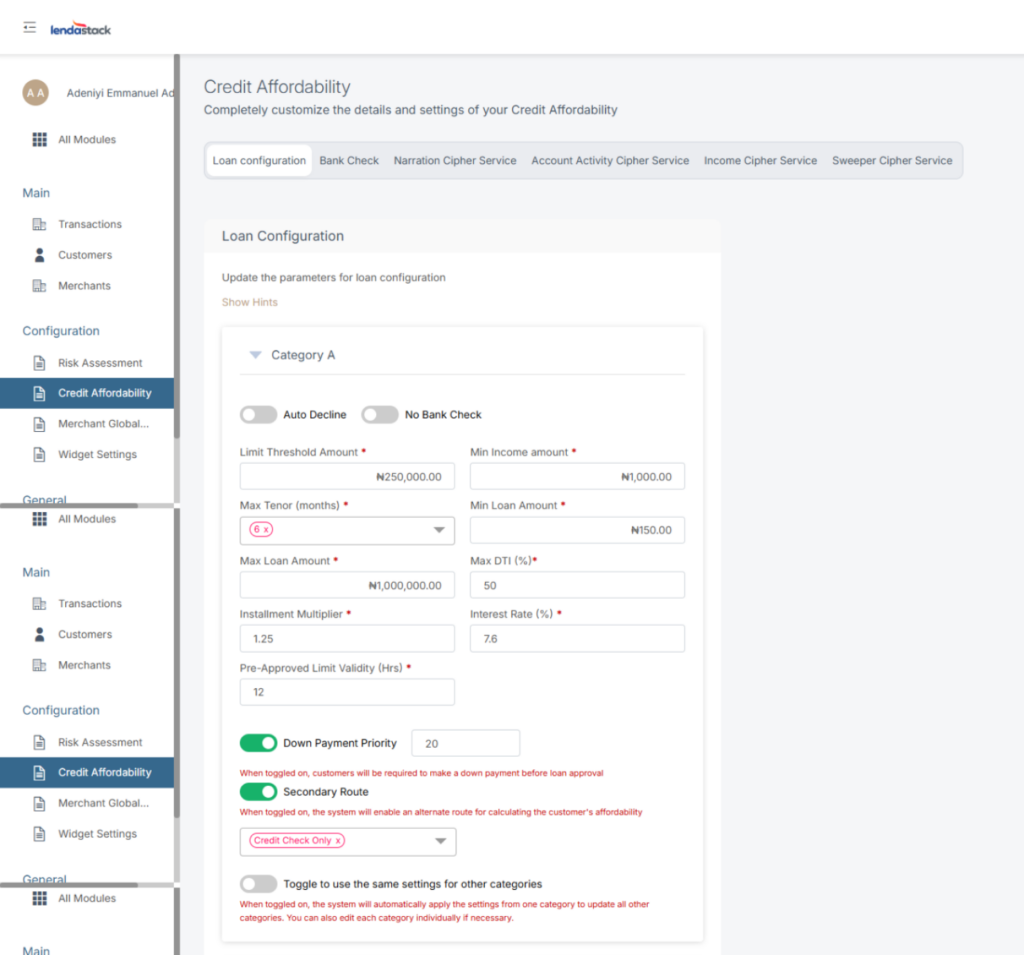
After all that is required is set, you will notice the last toggle button at the bottom of the modal.
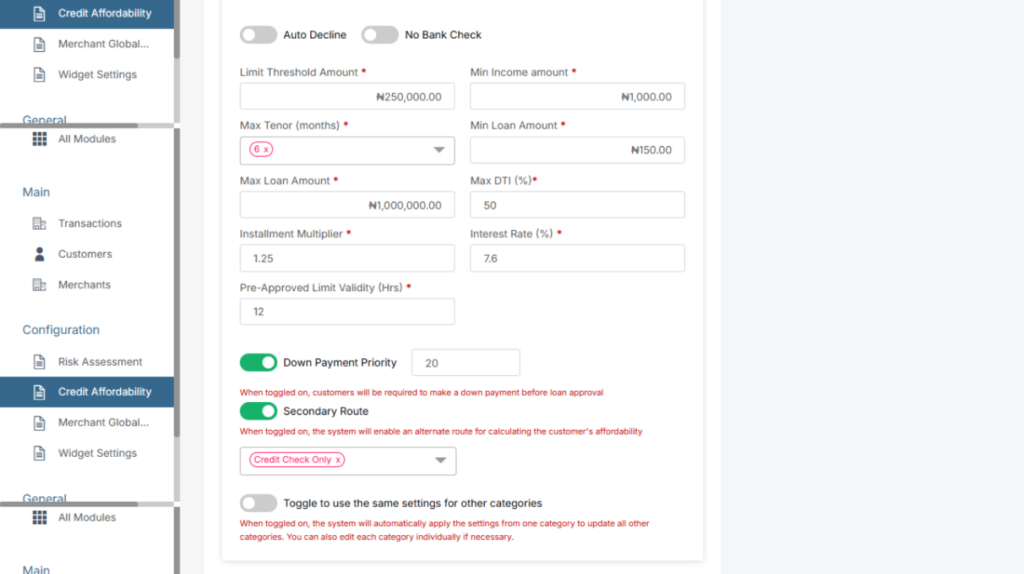
This toggle grants you access to use the same settings for other categories
When toggled on, the system will automatically apply the settings from one category to update all other categories. You can also edit each category individually if necessary.
Bank Check
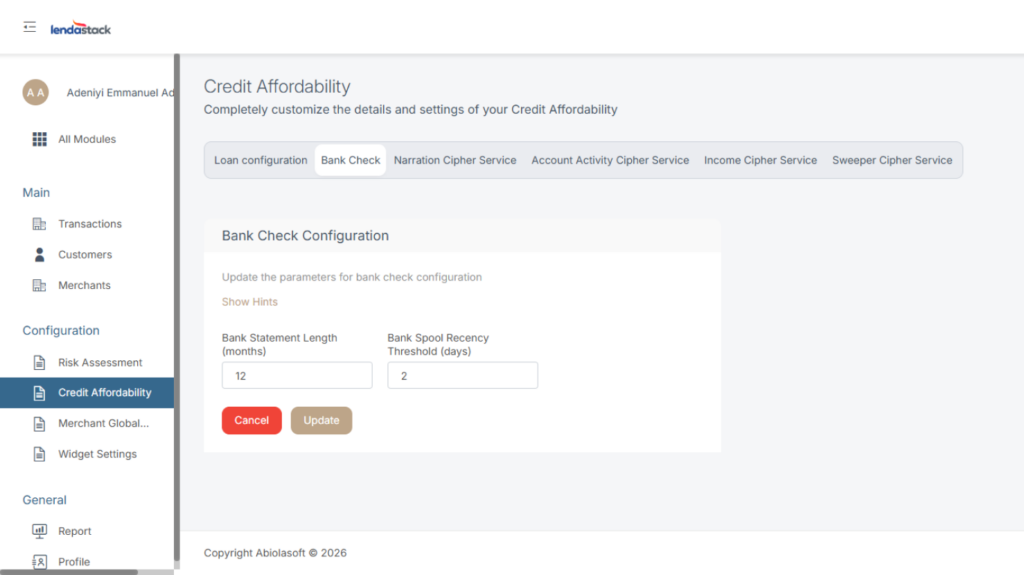
Once you click on Bank Check this action pops up a modal, click on edit on the top right corner of the modal, and set the desired information as follow
- Bank Statement Length: This configuration allows users to set the length of the bank statements to be considered during the assessment.
- Bank Statement Service: This configuration allows user to specify or set to default the service that will be used to extract bank statements.
Bank Statement Length / Bank Spool Recency Threshold / Bank Statement Service
6 Months 8 Days MBS
Once all information is inputted click on the update button to save setting.
Narration Cipher Service
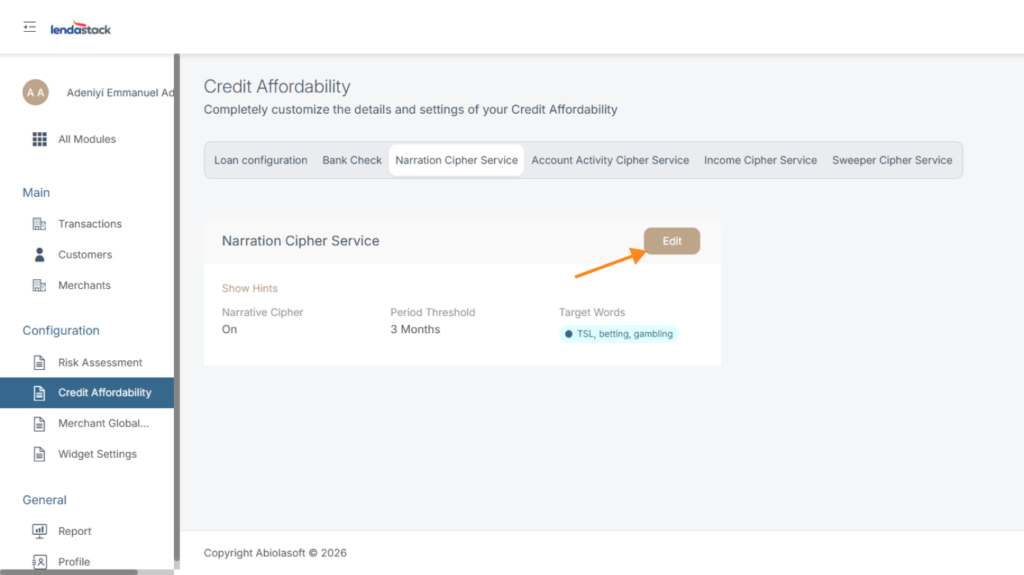
Once you click on Narration Chiper Service this action pops up a modal, click on edit on the top right Coner of the modal set the desired information as follow
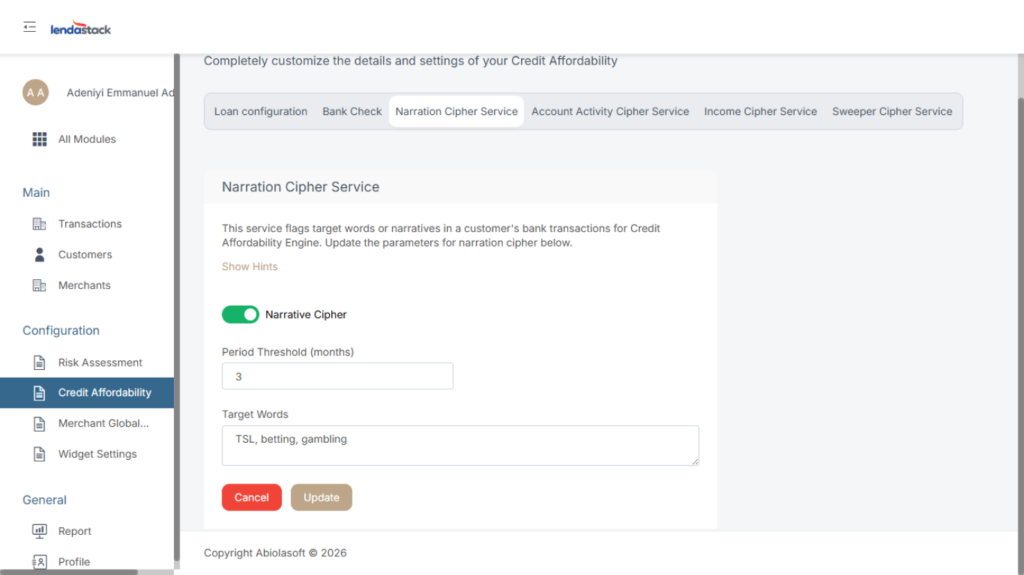
This service flags target words or narratives in a customer’s bank transactions for Credit Affordability Engine. See how to update the parameters for narration cipher below.
- Narrative Cipher: you will notice a toggle that can be turned both ways; this indicates if the narration service should be applied or not.
- Period Threshold: This defines the time frame, in months, for searching transactions within the bank statement.
- Target Words: These are the words in the search criteria that if found results in a FAIL of the Narration Cipher service.
Once all information is inputted click on the update button to save settings
Account Activity Cipher Service
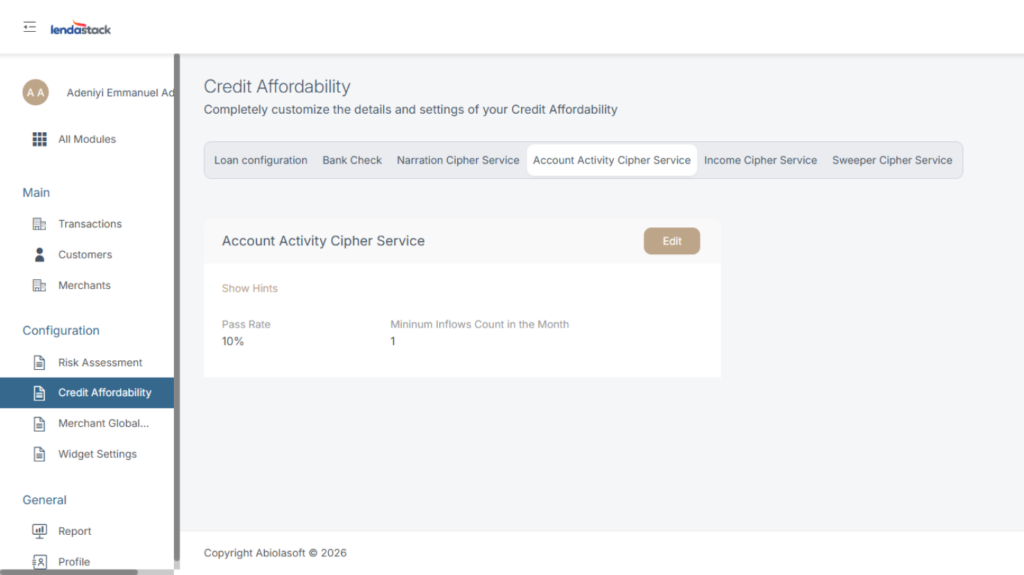
This service is to be used by the Credit Affordability Engine to check if a customer account has enough transaction activity levels in their bank account as required to be considered for a loan.
Once you click on Account Activity Chiper Service this action pops up a modal, click on edit button on the top right corner of the modal to set the desired information as follow .
- Pass Rate: This configuration sets a threshold for the account activity to pass-rate.
- Minimum Inflows Count: This configuration defines the minimum number of valid credit transactions that should be in each month on a customer’s bank statement.
Once all information is inputted, click on the update button to save settings.
Income Cipher Service
This service derives income from salaried customers in Credit Affordability Engine from bank statement analysis.
Once you click on Income Cipher Service, a modal pops up, click on edit on the top right Coner of the modal to update the parameters for Income cipher below.
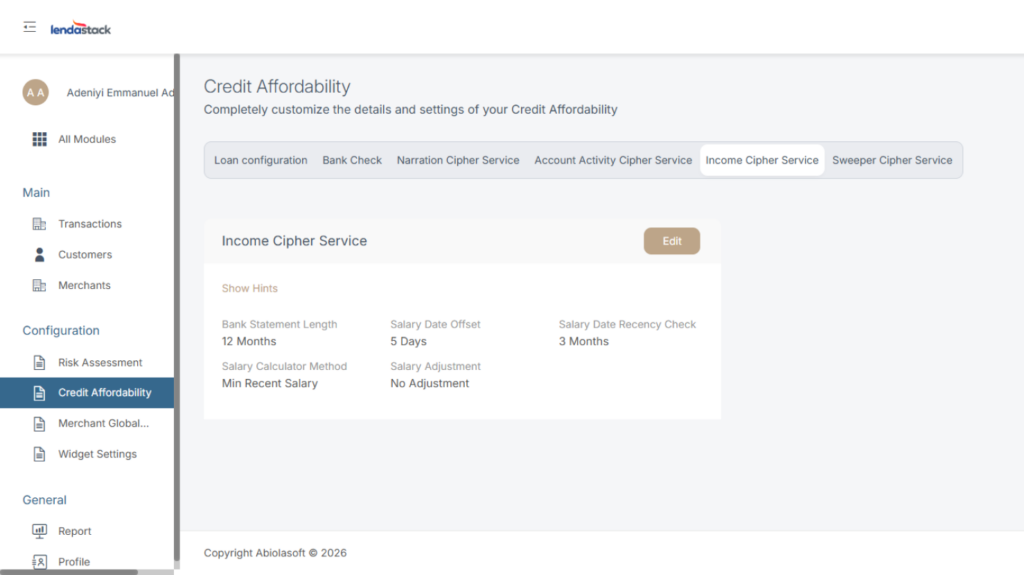
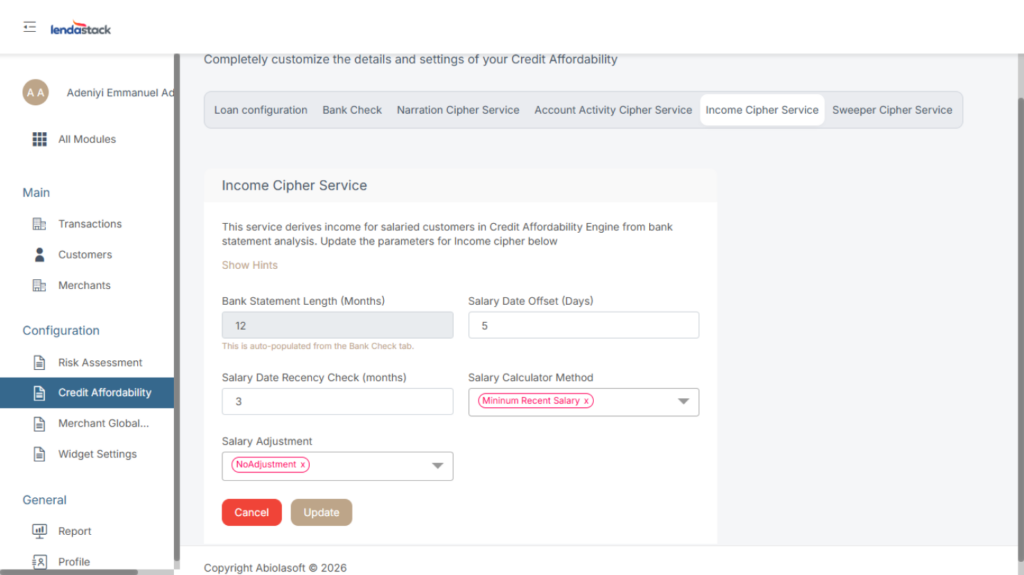
Bank Statement Length: This configuration defines the length of bank statements to be spooled based on the customer’s category. Eg- 2 month
Salary Date Offset Threshold: This parameter allows users to set a range that actual salary payment dates can fluctuate by from the actual Expected salary date
Salary Adjustment: This configuration provides options for applying an adjustment to the Derived Salary based on either a Flat percentage, or at least up to five percentages based on the confidence Interval score of the loan from Indicina’s bank statement analysis
Salary Date Recency Check: This configuration defines the number of months to be considered for all calculations which will need several recent months to be reviewed
Once all information is inputted, click on the update button to save settings.
Sweeper Cipher Service
This service identifies a customer’s spending/withdrawal habits for Credit Affordability Engine. Update the parameters for the sweeper cipher below.
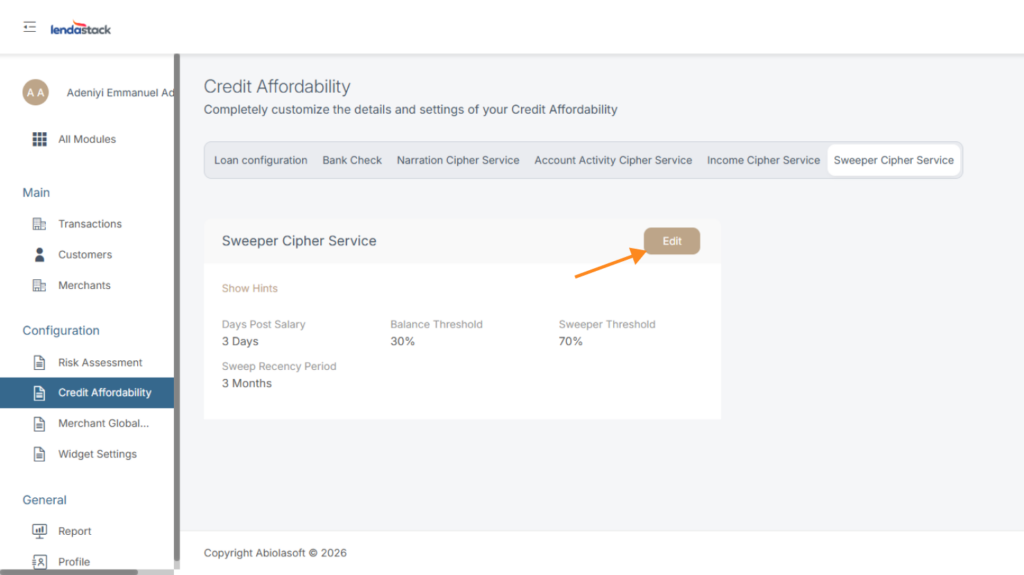
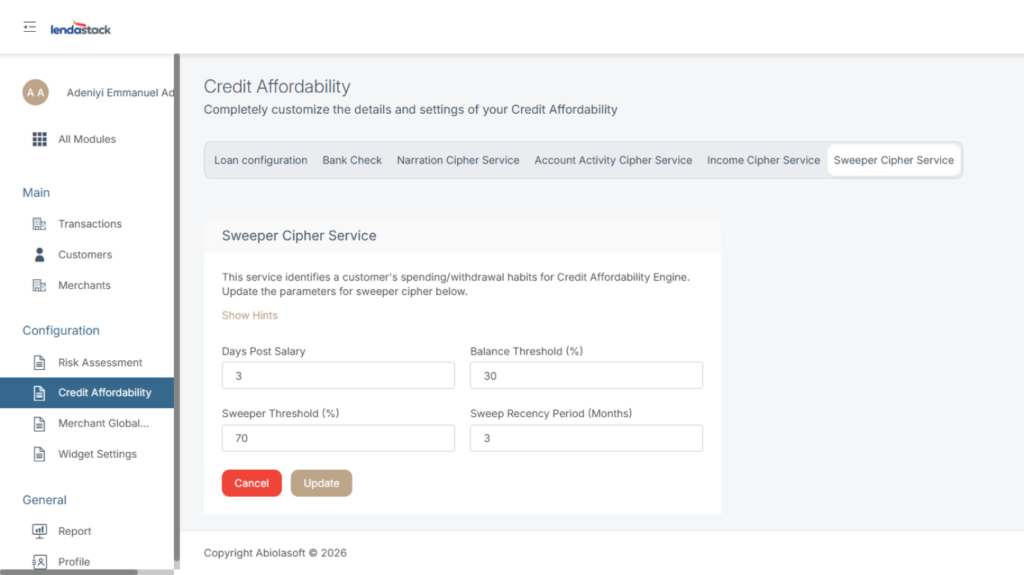
Days Post Salary: This configuration defines the number of days after the salary date that the system will check a customer’s account balance.
Balance Threshold: This configuration defines the percentage of the account balance that should remain after the specified number of days of post-salary.
Sweeper Threshold: This configuration allows users to set the sweep score threshold between 1 and 100 percent.
Sweep Recency Period: This configuration allows users to set the number of months they want to consider analyzing recent sweep consecutive occurrences.