Table of Contents
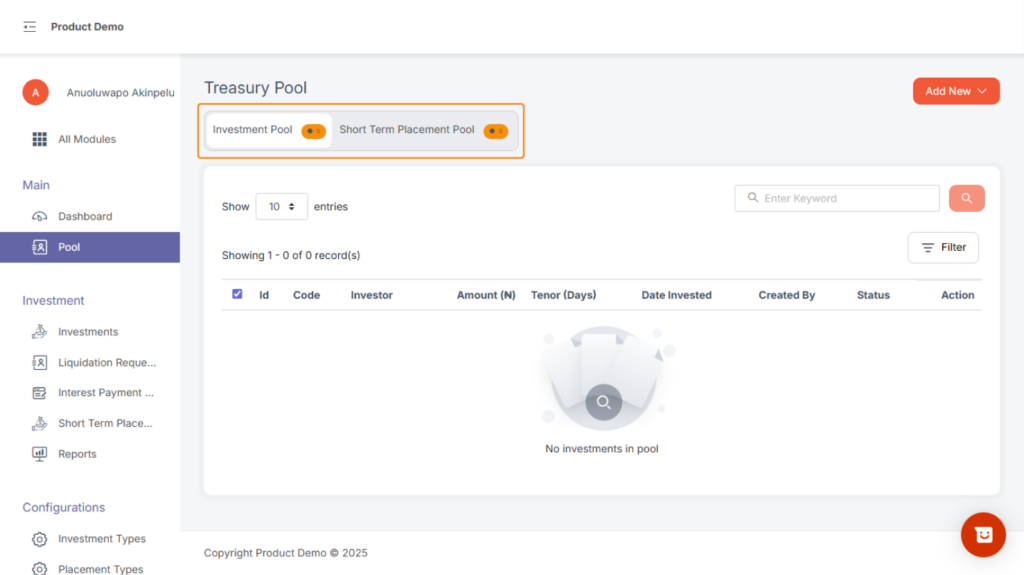
Inside the Pool page, the user will find two tabs: #
- Investment Pool
- Short Term Placement Pool
Both tabs allow you to view all pools created on the system. Each pool contains the investment and short terms placement that needs to be approved.
At the top-right, you’ll find an “Add New” button.
- When in the Investment Pool tab → You can add a New Investment Pool.
To add new investment in the pool,
1, click on “add new”
2, An investment search modal will pop up, Search with email address
3, An investment form comes up fill and click on the submit button.
4, A new investment will be created in the pool
NB: This works for investment type with approval setup.
- When in the Short-Term Placement Pool tab → You can add a New Short-Term Placement Pool.
1, click on “add new”
2, A short-term placement form will pop up,
3, fill the form and submit
4, A new short-term placement will be created in the pool
NB: This works for short-term placement type with approval setup.