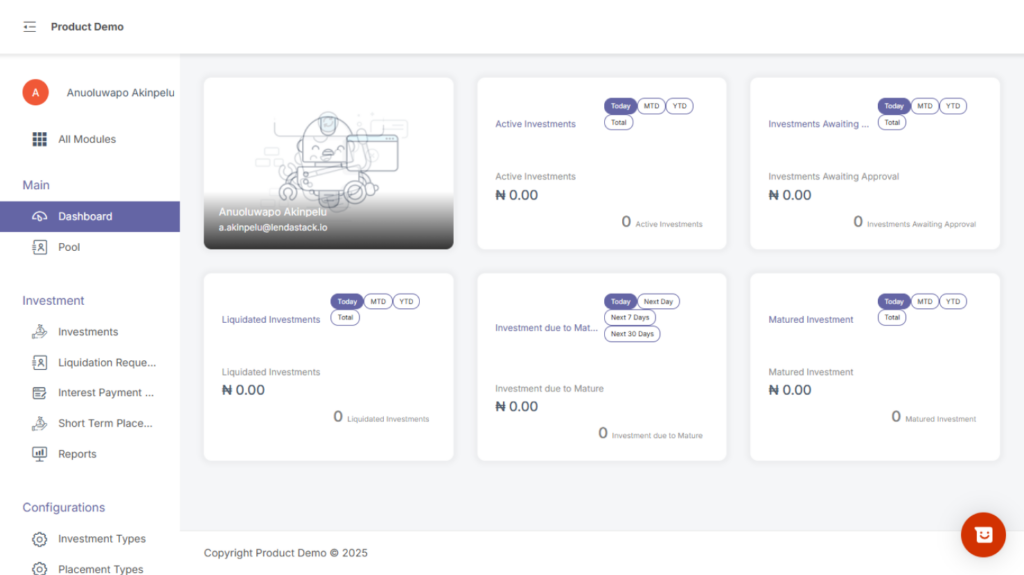
After entering the Investment Module, the user will see three major sections:
- Main
- Investments
- Configurations
MAIN SECTION
Dashboard #
The dashboard provides a summarized view of all investment activities happening across the system. It houses core metrics that help the user quickly understand the state of the investment operations.
The metrics include:
Active Investments – Total number of investments currently running and yet to be liquidated or terminated.
Investments Awaiting Approval – Investment requests (new or modified) that require admin authorization.
Liquidated Investments – Count of investments that have been fully liquidated (principal + interest paid out).
Investments Due to Mature – Investments close to their maturity date and will require liquidation or rollover soon.
Matured Investments – Investments that have reached their maturity date but have not yet been liquidated or processed.
This dashboard helps the investment team track activity at a glance and prioritize tasks.